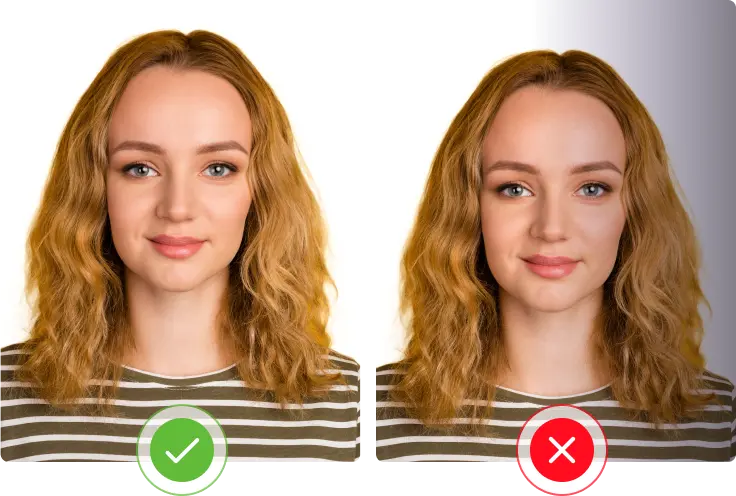
A bad photo is one of the easiest ways to get your passport application held up. The good news is the rules aren’t complicated once you see them laid out clearly, and most people can get a compliant photo without ever visiting a studio.
Quick Answer: Pakistan Passport Photo Size
The official size is 35mm x 45mm (about 1.4 x 1.8 inches), taken in color, against a plain white background.
Full Photo Specification Table
| Requirement | Detail |
|---|---|
| Size | 35mm x 45mm |
| Color | Full color, not black and white |
| Background | Plain white, no shadows, no patterns, no objects |
| Head height (chin to crown) | About 32-36mm, roughly 75% of the photo’s height |
| Space above the head | About 3-5mm from the top of the photo |
| Expression | Neutral, no smiling, mouth closed |
| Eyes | Open and clearly visible, looking straight at the camera |
| Photo age | Taken within the last 6 months |
| Digital file (for online upload) | Roughly 826 x 1062 pixels |
Background Rules
The background has to be plain white, nothing else. No gray walls, no patterned curtains, no furniture peeking in from the side, and definitely no shadows falling across the wall behind you. If your wall isn’t truly white, hanging a plain white sheet or poster board behind you works just as well.
Even lighting matters here too. A shadow on the wall, even a faint one, is a common reason photos bounce back. Natural daylight from a window in front of you usually gives the most even result.
Face and Head Positioning
Your face should take up roughly 70-80% of the photo, which usually means standing a few feet back from the camera rather than right up close. Look straight at the camera, keep your head level (not tilted), and keep a neutral, relaxed expression, no smiling, no raised eyebrows, mouth closed.
Both eyes need to be open and visible. If your hair normally covers part of your face, push it back for the photo so your full face, from chin to forehead, is visible.
What You Shouldn’t Wear
- Glasses: Best to skip these entirely. Glare and reflections are one of the most common rejection reasons, and frames can also partially hide your eyes.
- Hats or headwear: Not allowed, except for religious headwear that doesn’t cover your face. Even then, your full face from chin to forehead needs to stay visible.
- Uniforms: Avoid wearing any uniform in the photo (military, school, work, etc.), unless you’re specifically applying for an official or diplomatic passport that requires it.
- Heavy makeup or colored contact lenses: These can interfere with the biometric face-matching system, so it’s best to keep things natural.
For clothing in general, plain, solid colors that contrast with the white background work best. Avoid white or very light clothing that blends into the background.
Digital Photo Requirements for Online Applications
If you’re applying online instead of in person, you’ll upload a digital version of your photo. A few extra things to keep in mind:
- The photo needs to be the original, unedited image, not one cropped or resized from a larger photo
- No filters or heavy digital touch-ups
- File should be in JPEG format, sized to roughly match the 35mm x 45mm proportions
- The system checks for sharpness and lighting automatically, so a blurry or dark photo usually gets flagged before you even submit
Taking Your Own Photo at Home
You don’t need a professional studio for this. Here’s a simple setup that works for most people:
- Stand a few feet in front of a plain white wall, or hang a white sheet behind you
- Use natural daylight facing you, ideally near a window, rather than overhead lighting
- Have someone else take the photo from about arm’s length away, holding the camera at your eye level
- Keep a neutral expression, both eyes open, mouth closed
- Check the photo for shadows on your face or the wall before finalizing it
Children’s Photo Rules
The same basic rules apply to kids, plain white background, recent photo, neutral expression where possible. For babies and very young children who can’t hold a steady expression, a closed mouth and open eyes are still preferred, but officers generally allow some flexibility for infants who can’t fully cooperate with the camera.
Common Reasons Photos Get Rejected
- Background isn’t pure white, or has visible shadows
- Photo is older than 6 months
- Wearing glasses, a hat, or headwear that isn’t for religious reasons
- Head is tilted, or not centered in the frame
- Smiling, or an expression that isn’t neutral
- Photo was cropped from a bigger picture instead of taken specifically for the application
- Poor lighting, causing the image to look too dark, too bright, or blurry
Frequently Asked Questions
What is the exact passport photo size for Pakistan? 35mm x 45mm, taken in color against a plain white background.
Can I wear glasses in my e-passport photo? It’s best not to. Glasses commonly cause glare or partially obscure the eyes, which can lead to rejection.

Can I use an old photo for my e-passport application? No. Your photo needs to have been taken within the last 6 months and should reflect your current appearance.
Can I take the photo myself at home? Yes, as long as it meets the size, background, and lighting requirements above. Many applicants successfully use a plain white wall and natural daylight instead of visiting a studio.
This page is part of our complete e-passport series. For the full application process, see our step-by-step apply guide, and for the bigger picture, check our complete e-passport guide.
